
Turnitin 22% Similarity Twice: Non-Repository Explained

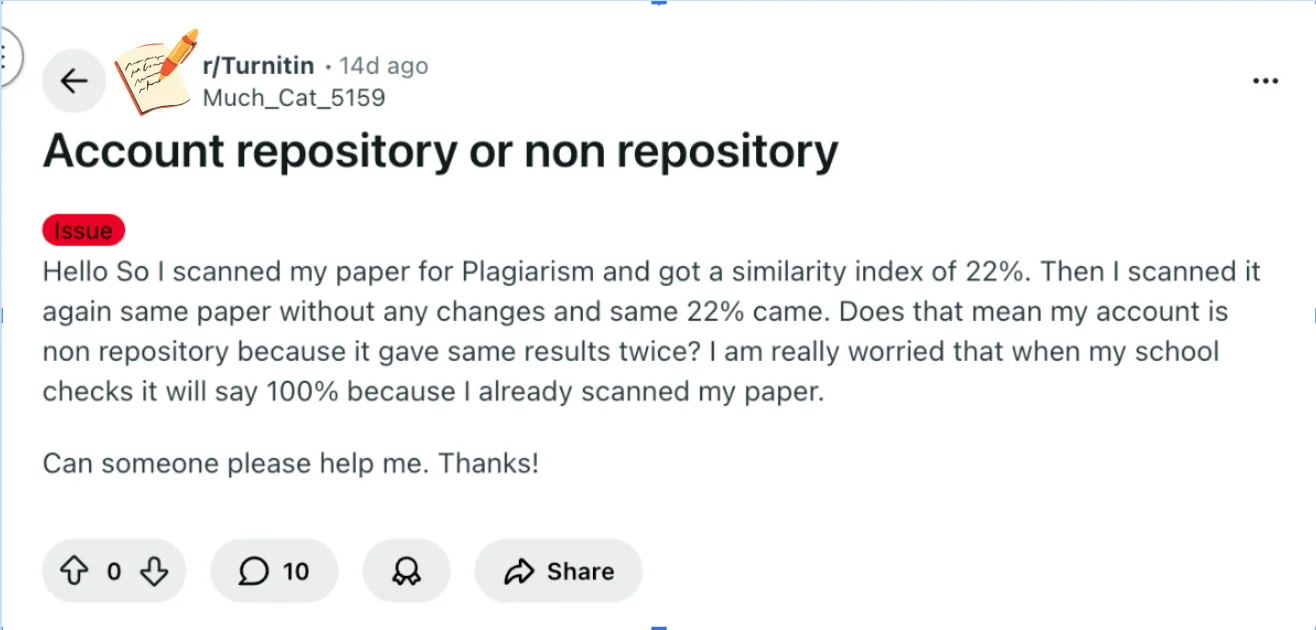
In a Reddit post, a student shared that their paper scored 22% similarity twice, and they were concerned that submitting it officially could trigger a 100% match.
I get why this feels stressful, especially if the assignment carries a large part of your grade. Understanding how Turnitin calculates similarity and handles repositories can help ease that anxiety and guide your next steps.
The first question you probably want answered is whether seeing the same similarity twice actually tells you anything about your account or repository settings.
TL;DR bullets
Getting 22% twice is normal if the document didn’t change.
It does not prove your scan was non-repository.
Repository settings depend on the assignment or instructor, not the scan itself.
Your final submission will not automatically become 100% similarity.
Turnitin reports are reviewed by instructors in context, not judged by the percentage alone.
Why Your Turnitin Score Stayed the Same (And Why It Won’t Automatically Become 100%)
Getting the same 22% similarity score or even a 36% Turnitin similarity score twice does not necessarily mean your account is non-repository, and it also does not mean your school submission will automatically become 100%.
Why the score stayed the same
When you scan the exact same document without changes, Turnitin will usually match it with the same sources in its database. Because the text and matches are identical, the similarity score often stays the same.
Repository vs. non-repository submissions
Whether a paper is stored depends on the assignment settings, not on how many times you scan it.
Standard repository: the submission is stored in Turnitin’s database for future comparisons.
Non-repository: the paper is checked for similarity but not stored.
These settings are controlled by the instructor or the platform, and students usually cannot see or change them.
Will your final submission become 100%?
In most cases, no. Even if a draft version exists somewhere, instructors can usually see that it’s the same student’s earlier submission. Turnitin reports are also reviewed by instructors, who can exclude drafts or small matches if needed.
What you should do
If you’re worried, the safest approach is to:
make sure your citations and paraphrasing are correct
submit your final version through your instructor’s official assignment
ask your instructor or administrator if you want confirmation about repository settings
In short, getting the same similarity score twice is normal, and it does not automatically mean your final submission will show 100% similarity.
Understanding that repeated similarity doesn’t guarantee non-repository status makes it important to know the key Turnitin concepts that affect what you see in your report.
Key Turnitin Concepts You Need for This Question
Understanding why your paper shows the same 22% similarity twice starts with a few core Turnitin terms and settings. These affect how similarity reports appear and whether your paper is counted as being in a repository.
Turnitin Similarity score – This is the percentage of your text that matches other sources Turnitin can access. Even if you scan the same paper twice, the score can remain identical if the content hasn’t changed.
A repeated similarity doesn’t automatically indicate whether your paper is stored in the repository.
Repository (account vs. assignment) – Turnitin allows submissions to either an institutional repository or just the assignment check.
Each assignment can be set up differently. Some assignments submit papers to the repository, making them available for future checks; others do not.
This explains why scanning the same paper across different assignments may produce the same or different results.
Match highlights and sources – Turnitin shows which parts of your text match external sources and whether the matches come from papers in the repository, journals, or web content.

CrossCheck – Turnitin compares your paper against its repository and other sources.
Prior scans may influence results depending on how the assignments are configured, but they do not guarantee a higher similarity for later submissions.
Assignment settings – These control how similarity is measured and whether papers go into the repository.
Settings also dictate whether resubmissions are allowed and whether the system can cross-reference your prior work.
Because these options vary by assignment, students usually cannot tell repository status simply from similarity scores.
Recognizing which text is flagged can help you focus on proper citations or paraphrasing.
By understanding these concepts, you can see why repeated similarity is normal and why repository status isn’t immediately obvious.
This knowledge also guides you in safely interpreting Turnitin results and deciding your next steps.
When Similarity Scores Can Change
Even if your score stayed the same in two checks, Turnitin similarity scores can change later. This can happen when:
you edit or rewrite parts of the paper
new sources are added to Turnitin’s database
report filters change (for example excluding quotes or bibliography)
Because Turnitin’s database is constantly growing, the similarity percentage is not always fixed.

Does Checking Your Paper Always Store It?
Not every Turnitin check stores your paper in the database.
Whether a paper is stored depends on the repository setting used in the assignment:
Standard repository – the paper is stored and used for future comparisons.
Institution repository – stored only within your school’s database.
No repository – the paper is checked but not saved.
These options are controlled by the instructor or administrator, not the student.
How to Check Repository Status Safely
It’s normal to wonder if your paper has been added to Turnitin’s repository, especially after seeing repeated similarity scores.
The first thing to know is that Turnitin usually does not reveal repository status to students. You can’t rely on repeated scans alone to confirm whether your work is stored.
The safest ways to check involve assignment settings or instructors:
Review the assignment instructions or Turnitin submission portal for notes on repository submission.
Ask your instructor or teaching assistant privately if your paper will be stored in the repository or only checked for similarity.
Avoid trying to use someone else’s Turnitin account or submitting your paper to a third-party platform just to test repository status.
These approaches can violate academic integrity rules and may create more problems than they solve.
Even with these limits, understanding that repository visibility is mostly controlled by assignment settings helps reduce anxiety.
Your goal is to make sure your paper is properly cited and well-paraphrased before submitting officially.
Taking these careful steps gives you confidence without risking misconduct, while keeping you informed about how your Turnitin report will likely appear.
Bonus Tip: Non-Repository Turnitin Checkers
If you're concerned about your work being stored in a repository and affecting your future submissions, non-repository Turnitin checkers like Turnitindetector offer a reliable solution. These tools provide the same detailed similarity reports without the risk of your paper being stored in any database.

With T-detector, you can:
Check for Similarity Without Repository Submission – Unlike Turnitin, your paper is not stored in any database, so it won’t be added to any repository that could impact your future submissions.
Turnitin AI Content Detection – It identifies AI-generated content, showing you what your professor would see, without the risk of your paper being flagged in Turnitin’s database.
Privacy and Security – Your paper is checked and then deleted, ensuring it remains confidential and is not submitted to any repository.
No Impact on Final Turnitin Score – Since your paper isn’t stored anywhere, it won’t affect the similarity score when you submit it to Turnitin officially.
Using non-repository Turnitin checkers like Turnitindetector ensures your paper is reviewed for plagiarism and AI content without the worry of it being stored or impacting future submissions.
Conclusion
A repeated 22% similarity doesn’t automatically mean your Turnitin account is non-repository, and prior scans don’t guarantee a 100% match when you submit officially.
What matters most is ensuring your citations are correct and your work is properly paraphrased. The safest next step is to check your assignment settings or speak with your instructor about repository rules.
Focus on polishing your paper—Turnitin will reflect your accurate, original work when it’s submitted officially, and you’ll have minimized any unintentional flags.