
Turnitin Web vs Software: Features, Access, and Uses

In a Reddit post, a student asked whether the Turnitin Software they downloaded works the same way as the official web version used by tutors.
They wanted to know if it was reliable for checking both similarity and AI-generated content. This question is common for anyone trying to get a sense of their work’s originality before submission.
Understanding the differences between official and third-party tools can help you avoid misleading results and potential security issues.
This leads us to a straightforward answer: can you trust the software you downloaded, or should you stick with the web version?

Quick Answer to Turnitin Software Reliability
Direct Answer
Turnitin generally used in combination with Learning Management Systems (LMS). Usually you need to log in to Turnitin with credentials to use it. If someone is selling Turnitin software as a downloadable desktop version, it is likely unauthorized and poses a security risk.
Key Turnitin Concepts You Need for This Question
Since the main concern is whether the downloaded Turnitin Software gives the same results as the web version, it helps to understand how Turnitin works and what its reports include. These concepts clarify why unofficial tools may be unreliable.
Similarity Score
The similarity score shows the percentage of your text that matches sources in Turnitin’s database.
A higher score doesn’t automatically mean plagiarism—it just flags overlapping text.
Differences in databases and algorithms mean unofficial software may produce a very different score.

Match List
The match list identifies where overlaps occur and cites the exact sources.
In the web version, you can click through to check context, but unofficial tools may not provide detailed source information. Missing context can make results less useful for improving your paper.
AI Indicator
Some Turnitin reports include an Turnitin AI detection feature that flags likely AI-generated content.
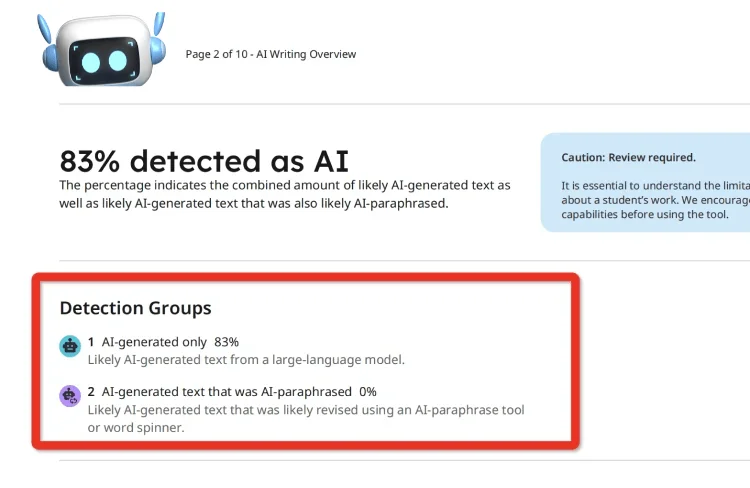
The web version uses its own algorithms and settings, which may not be replicated by third-party software. Results from unofficial tools may underreport or overreport AI content.
Repository
Turnitin compares submissions against a repository of student papers, academic publications, and online content.
Access to this repository is what makes official reports accurate. A downloaded or third-party tool probably cannot reach the same database, which limits reliability.
Settings and Filters
The web version allows instructors to set filters, such as ignoring quotes, bibliographies, or small matches.
These settings affect the final similarity score and match list. Without access to the same settings, unofficial software results may appear misleading.
Understanding these concepts helps you see why relying on unofficial Turnitin Software could produce reports that differ from what your tutors see.
Being aware of how similarity, matches, AI flags, repositories, and filters work lets you interpret any preliminary results more realistically.

Peer Review and Grading
In addition to plagiarism checks, Turnitin integrates with LMS systems to allow for peer review assignments and online grading.
Risks and Limitations of Using Unknown Turnitin Software
As we discussed earlier, schools primarily use the web version of Turnitin, which offers comprehensive and secure plagiarism detection. Using software from unknown or unverified sources carries several risks:
First, unofficial tools typically lack access to Turnitin's vast and regularly updated database. Therefore, these tools may miss important matches, or the similarity reports and AI-generated detection reports may not match what teachers see. This can lead to unrealistic trust in submitted assignments by teachers or unnecessary anxiety for students when detection results are inaccurate.
Security is another major concern. Downloading software from unverified sources exposes your device to potential malware, viruses, or other security threats. Even if the software appears to function correctly, it may still compromise your device or leak your files.
However, there are indeed alternative tools that offer similar functionality to Turnitin. Authoritative tools will not harm your paper or your computer. These tools generally have the following characteristics: reliable detection algorithms, access to a wide range of databases, and a secure, user-friendly interface. TurnitinDetector is one such tool that provides a trustworthy alternative without compromising the integrity of your work or your security.
Key Benefits:
Preliminary Similarity Check – Get an early look at your paper’s similarity score, allowing you to address any sections that may appear too similar to other sources before submitting it to Turnitin.
Turnitin AI Detection – Identify AI or AI-generated content with a detailed AI report, showing exactly the report that your professor will see.
No Database Submission – Your paper is never stored or uploaded to any repository, so you don’t need to worry about it affecting your final similarity score when you make the official submission.

Conclusion:
To summarize, the focus of this article is to explore whether you can truly trust a Turnitin program you found online.
While many options may promise similar functionality, it’s important to carefully evaluate the reliability and security of these tools.
Opting for well-established and secure alternatives, like TurnitinDetector, ensures that your paper’s originality is accurately checked without compromising your data. Ultimately, choosing the right tool for your academic needs requires careful consideration to maintain both the quality of your work and your privacy.