
How to Use Turnitin for Free: A Step-by-Step Guide

Many students search for free Turnitin access because they want to check a paper before submission, but legitimate access is usually tied to a school, course, writing center, or approved platform.
The safest approach is to use authorized access, understand report limits, and avoid shortcuts that ask for your class credentials or full draft.
How to Use Turnitin for Free

In most cases, you can use Turnitin without paying directly only when your school, course, or approved academic service provides access.
Turnitin is mainly licensed through institutions, so students usually reach it through an LMS, instructor assignment, writing center, or university-supported account.
Access Through Schools or Universities
Many colleges and universities include Turnitin in course workflows at no extra student cost. You may access it through Canvas, Blackboard, Moodle, or another LMS when your instructor enables a Turnitin assignment.
Check with your instructor or academic department to confirm whether your account includes Turnitin access and whether there are submission limits per assignment or semester.
Partner Platforms Offering Limited Free Access
Some writing centers, tutoring programs, or school-supported portals may provide limited originality checking. Use these options only when they are clearly connected to your institution or an authorized academic service.
Before uploading a paper, confirm who can see the report, whether drafts are stored, how many submissions are allowed, and whether you can view the Similarity Report yourself.
These methods are safest when they keep your paper inside a school-approved workflow and make the report rules clear before you submit.
Official Methods to Access Turnitin
Institutional Accounts and Student Portals
Many institutions provide Turnitin through course accounts rather than personal student subscriptions. Logging in through your school portal helps ensure the submission belongs to the correct class and assignment.

Typically, you need your student credentials, and your submissions are automatically linked to your course assignments. Confirm with your instructor or IT support which portals provide Turnitin access and any submission limits that may apply.Without your student ID, you can't enroll in the class on Turnitin.
Library or Writing Center Resources
University libraries and writing centers may offer supervised originality review or writing support. Availability varies, so ask whether they use Turnitin, another checker, or a staff-led review process.
Using these services can be especially helpful if you are not enrolled in a course that provides direct Turnitin access. Always check availability, hours, and any required appointments before submitting your work.
Institutional access is usually the safest free route because it follows school rules and avoids sharing your paper with unknown third parties.
Tips for Maximizing Free Turnitin Access
Correct File Formats and Submission Guidelines
To avoid upload problems, follow the file types and size rules shown in your school portal or assignment instructions.

Ensure that your file is free of unusual fonts, embedded images that aren’t necessary, or excessive formatting, as these can interfere with similarity detection.
Follow any specific submission instructions from your school, portal, or partner platform, including naming conventions and assignment links, to prevent delays or errors in generating reports.
Avoiding Common Errors When Using Free Access
When access is limited, small mistakes can leave you without a usable report or another submission attempt.
Do not exceed submission limits on free trials or partner accounts, and double-check that your file has uploaded completely before finalizing submission.
Avoid submitting incomplete drafts, and make sure you are logged into the correct account to retain access to your originality report. Staying organized with these precautions helps ensure you get the most reliable feedback from Turnitin for free.
Following these practical tips ensures your submissions are processed smoothly and prepares you to interpret the reports effectively when reviewing Turnitin results in the next section.
Understanding Turnitin Reports
Similarity Scores and Source Matches
A Turnitin Similarity Report shows the percentage of text that matches sources in the comparison set, but the number alone does not prove plagiarism.
The report highlights matched content and provides links to the original sources, helping you identify where citations or paraphrasing may need improvement.
If you can view the report before final submission, use it to fix citation gaps, over-close paraphrasing, missing quotation marks, or source confusion.

AI Detection and Originality Feedback
Some Turnitin setups include AI writing indicators, but student visibility can depend on the institution and assignment settings. Treat any AI signal as a prompt to review the highlighted writing, not as a final judgment by itself.
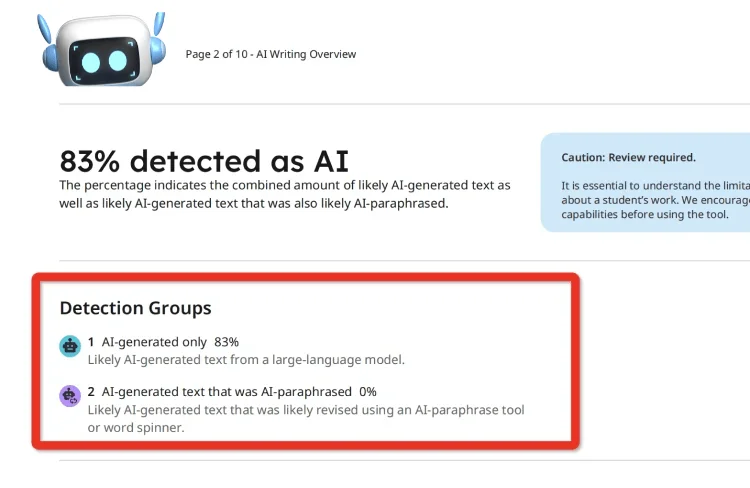
Paying attention to these signals and combining them with your own review helps you maintain authentic and properly cited content, preparing you for more detailed analysis if you later access the full Turnitin platform.
Understanding these core report elements makes it easier to interpret your results and apply improvements, setting the stage for common questions and clarifications addressed in the Frequently Asked Questions section.
FAQ
1. Can I Truly Use Turnitin for Free Without Any Account?
Turnitin in an LMS requires either a school/institution account, trial access, or a partner platform. Free use without an account is not officially supported. However, a Turnitin detector or DocxTurnitin can help you get a report without needing an LMS account.
2. Does Turnitin for Free Offer Full Features?
Free or school-provided access may limit submissions, report visibility, or AI-report access depending on your institution's settings.
3. How to Use Turnitin for Free as a Student?
Students can use Turnitin for free via their school’s learning management system, institutional portals, or university-provided writing center accounts.
4. How to Use Turnitin for Free Reddit?
Reddit may mention workarounds, but avoid methods that ask for class IDs, logins, or full drafts. Use school-approved access or transparent report tools instead.
5. Can I Submit Multiple Papers Using Free Turnitin Options?
Submission limits vary by free trial or institutional access. Always check your portal or trial restrictions to avoid exceeding allowed submissions.
6. How to Use Turnitin for Free Without a Class ID?
Some school-supported workflows do not require you to enter a class ID yourself because the LMS handles it. If you do not have class access, use a legitimate report-review option rather than borrowing someone else's account.
Conclusion
Using Turnitin for free is possible mainly through legitimate school or institution-supported access, not through random shared accounts or unsafe shortcuts.
From school and institutional accounts to free trials and partner platforms, readers now understand how to submit papers and check originality without paying.
When direct access is limited, focus on safe report review, careful citation checks, and privacy-aware tools that help you revise without misusing institutional systems.