
How to Check Turnitin Score Before Submitting Your Paper

Many students want to check a Turnitin score before submitting because they need time to fix citation problems, close paraphrases, or unexpected similarity matches.
The confusing part is that report access depends on your school’s settings, and a draft preview may not show the exact same result as the final submission.
Here is the practical path: use an approved draft or pre-submission report when available, read the score in context, revise flagged sections, and avoid treating any preview as a promise of the final result.
How to Access Your Turnitin Score Before Submitting

You can check a Turnitin score before submitting only when your institution, instructor, or approved platform gives you access to a draft or pre-submission report.
When draft reports are available, use them to find avoidable similarity issues before final submission. They help with revision, but they do not remove the need to review sources yourself.
Institutional Draft Submissions
Some colleges and universities provide draft submission through the LMS. If your course allows it, you can upload a draft, review the Similarity Report, and revise before the official deadline.
Confirm the rules first because draft access varies by institution, course, and assignment. Make sure you are using the draft area, not the final submission slot.
Using Turnitin Draft Check Tools
Turnitin Draft Coach and similar pre-submission tools allow users to upload documents privately.These tools generate similarity reports without sending the work to the permanent Turnitin database.
You can review flagged passages, citations, and overall similarity percentages, then revise your document accordingly. Using these tools helps you understand which areas may need paraphrasing or proper citation before submitting to the final assignment portal.

Limitations and Privacy Considerations
Pre-submission tools may not match the final Turnitin report exactly. New sources, assignment settings, exclusions, or repository access can change what appears later.
Also check how drafts are stored and whether repeated uploads count against attempt limits. Your school’s privacy and resubmission rules matter before you upload several versions.
Once you know what access you have, the next step is understanding what the score actually tells you and what it does not.
Understanding Turnitin Scores and Reports
A Turnitin score is useful only when you read it with the matched sources and assignment settings. The number is a starting point for review, not a verdict by itself.
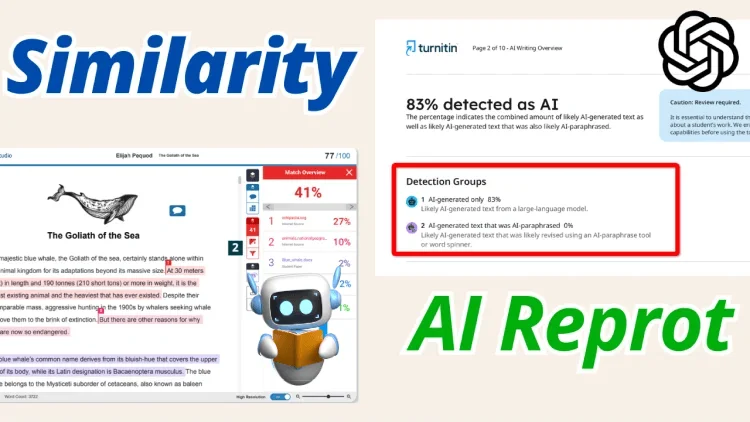
What a Turnitin Score Represents
A similarity score shows the percentage of text that matches sources in the comparison set, such as web pages, publications, and submitted papers available to that report.
A higher score does not automatically mean plagiarism. It may include quoted text, references, common phrases, or properly cited material that still needs context.
Components That Influence Your Score
Several factors can affect your Turnitin score. Direct quotations, proper or improper citations, commonly used phrases, and technical terms may all contribute to matches.
Additionally, content copied from previous submissions within the same institution or similar publicly available documents can increase the similarity percentage.
Understanding these components helps you distinguish between legitimate overlaps and potential issues.
Interpreting Similarity Percentages
Read similarity percentages in context. A low score can still contain an uncited high-risk match, while a higher score may include correctly quoted or referenced material.

Focus less on chasing a single number and more on reviewing highlighted matches, citations, quotations, and paraphrased passages before final submission.
Once you understand the score, you can make targeted revisions instead of rewriting sections that are already cited correctly.
Tips for Reducing Your Turnitin Score
After understanding what a Turnitin score represents and how to interpret similarity percentages, the next step is applying practical strategies to reduce your score before submitting.
These tips help ensure your work reflects originality while maintaining proper academic standards.

Proper Citation and Quotation Practices
Always cite sources accurately according to the required style guide, whether APA, MLA, or Chicago. Use quotation marks for direct quotes and include page numbers when applicable.
Proper citations help readers and instructors see where borrowed ideas come from. Double-check bibliographies, in-text citations, and quoted passages for missing or inconsistent details.
Paraphrasing vs. Copying
Strong paraphrasing explains the source idea in your own sentence structure while preserving the original meaning and citing the source.
Avoid only swapping words or rearranging clauses. That can still look too close to the source and may create citation or originality concerns.
Avoiding Common Similarity Triggers
Be cautious with boilerplate text, standard definitions, and widely used phrases, which can appear as matches in Turnitin.
Where possible, rephrase commonly cited material and minimize overuse of direct quotes. Also, check for accidental reuse of your own previous work that may be stored in Turnitin’s database.

These methods can reduce avoidable matches and make your report easier to interpret before you look for another preview option.
Alternative Methods to Preview Your Turnitin Score
After revising, you may still want another preview before the official submission. Use options that respect your school’s rules and protect your draft.
These approaches provide additional insight into potential similarity issues and allow for final adjustments.
Peer or Instructor Review Platforms
Some courses offer peer review or instructor review platforms integrated with Turnitin. By sharing drafts within these systems, you can receive feedback on flagged sections, citation accuracy, and overall originality.
This method can show likely problem areas before the official portal submission, especially citation gaps, overused quotes, or sections that need clearer paraphrasing.
Using Plagiarism Prevention Tools Within Turnitin
Turnitin provides pre-submission tools, such as Draft Coach, that allow you to check similarity privately. These tools generate a report showing matched text without saving the document in the permanent Turnitin database.
Users can identify problematic sections, make edits, and resubmit drafts to see improvements, helping ensure a smoother final submission.
Understanding What These Methods Can and Cannot Show
Alternative previews may not fully match the final Turnitin report. Database coverage, assignment exclusions, and instructor settings can change the score.
Treat previews as guidance, not certainty. Review the highlighted text and make careful revisions before submitting the final version.
Using these methods prepares you to address potential issues proactively, setting the stage for common questions students and general users often have about Turnitin reports in the FAQ section.
FAQ
1. Can I Always Check My Turnitin Score Before Submitting?
Not always. Access depends on whether your institution, instructor, or course provides draft submission or pre-submission tools. Confirm before uploading.
2. Will Checking How to Check Turnitin Score Before Submitting Affect My Final Submission?
No. Using draft or pre-submission tools typically does not impact the official Turnitin record, as long as you select the draft option and follow institutional guidelines.
3. How to Check Turnitin Score Before Submitting Free?
Some institutions provide free access through draft submission portals or Turnitin-integrated platforms. Check with your school’s LMS or instructor for available pre-submission options.
4. Can Revisions Lower the Turnitin Score Before Submitting?
Yes, revising flagged text, improving citations, and paraphrasing more carefully can reduce avoidable similarity, although results can vary.
5. How to Check Turnitin Score With Submission ID?
Some platforms allow you to view your similarity report using the submission ID provided after draft upload. Log in to your Turnitin account or course portal and enter the ID to access the report.
6. Does Viewing Turnitin Scores Before Submitting Guarantee No Plagiarism Flags?
No. Pre-submission checks are guides and may not capture all matches. The final official Turnitin submission could flag additional content from its full database.
Conclusion
Knowing how to check a Turnitin score before submitting helps you catch citation, paraphrasing, and originality issues while there is still time to revise.
Start with school-approved draft access when it exists, then read the report carefully instead of focusing only on the percentage.
A pre-submission score is most useful when it leads to specific fixes: clearer citations, better paraphrasing, cleaner quotations, and a final draft you understand.